 LScope
An industrial diagnostic app by LeRoy Industrial LLC
Troubleshoot a stopped machine from your iPhone or iPad.
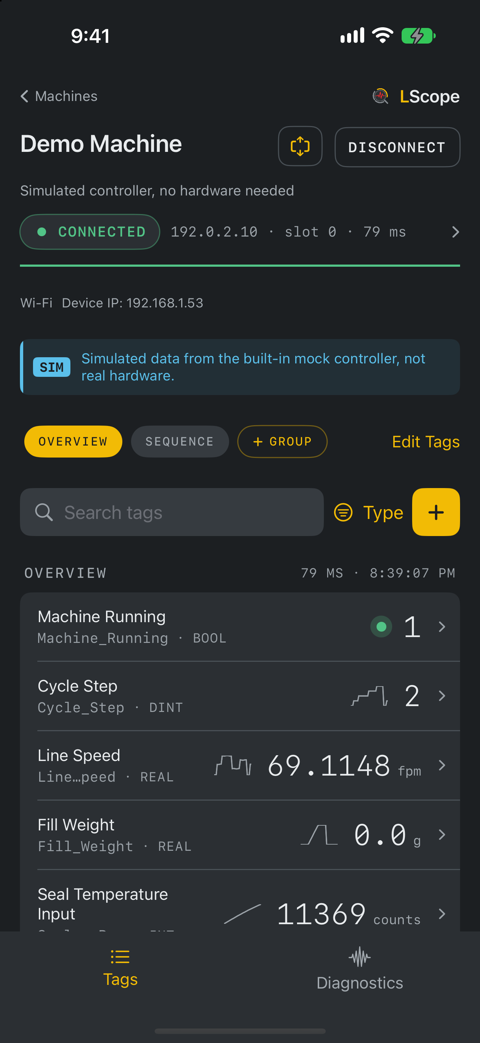
Arm a trigger on a tag condition and keep the seconds before and after it. Read live tags, see which signals moved in what order, see how long each observed step of the cycle takes, and share the evidence before you leave the floor. LScope does not write tag values.
Read-only by designOn the machine
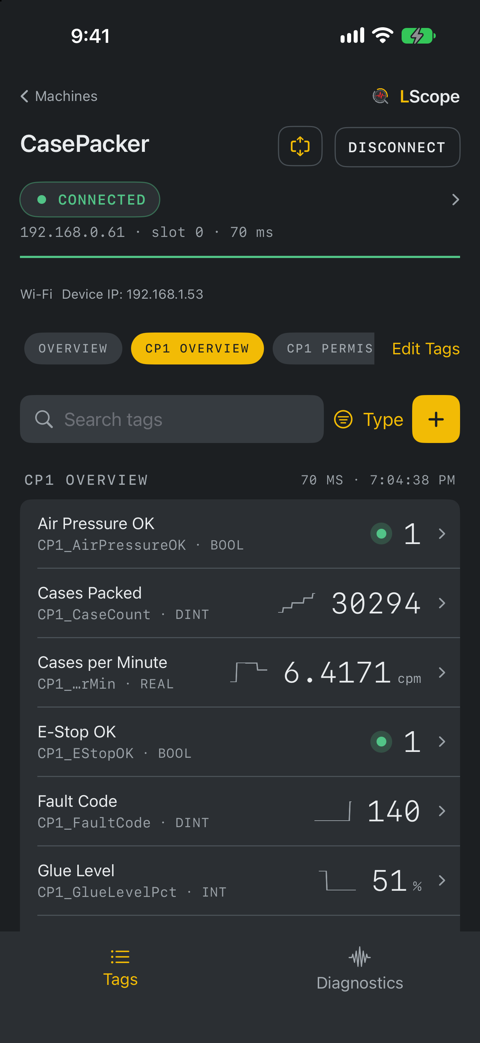
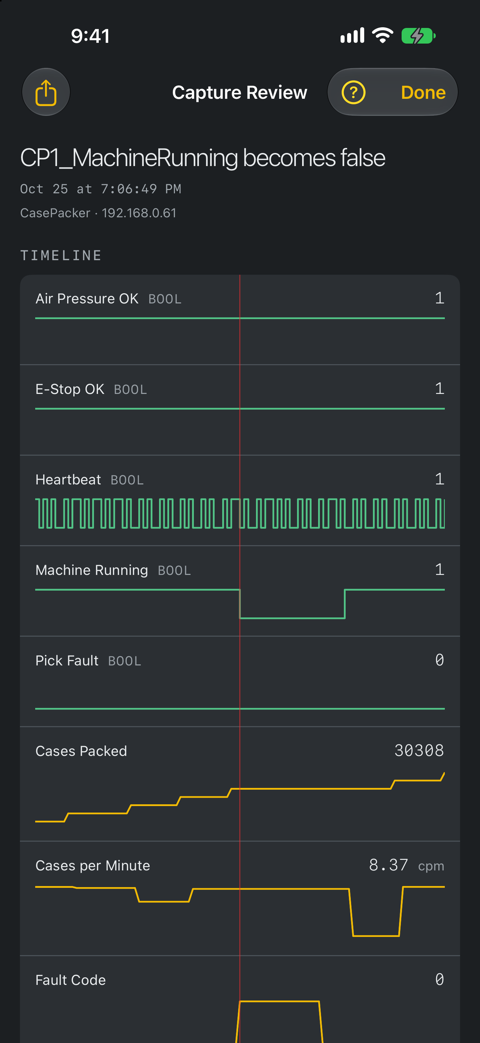
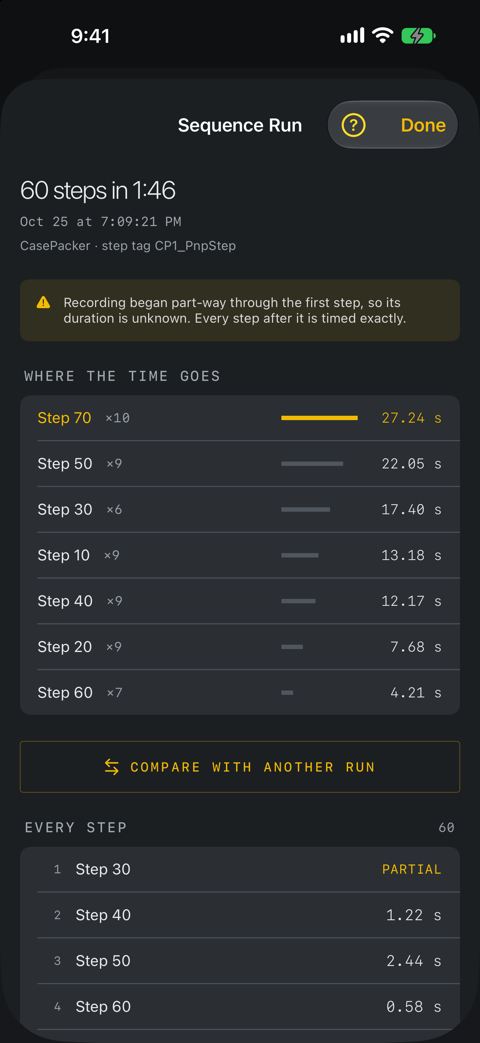
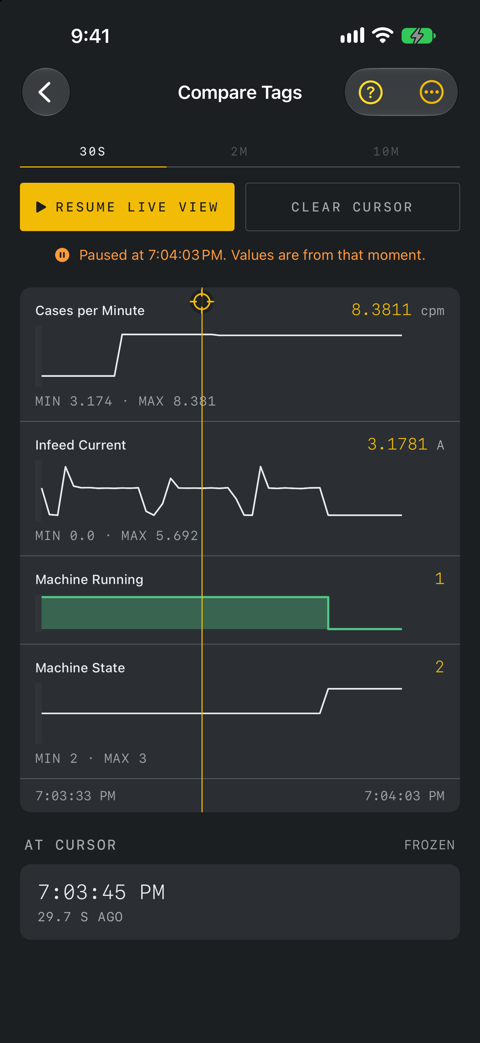
Swipe to see moreHover to pause
On iPad
See it run
Screens and recordings show LScope reading a bench controller that runs a simulated case packer. Connecting to your own controllers needs LScope Pro; the demo machine is free.
What it does
Keep the seconds around an intermittent event
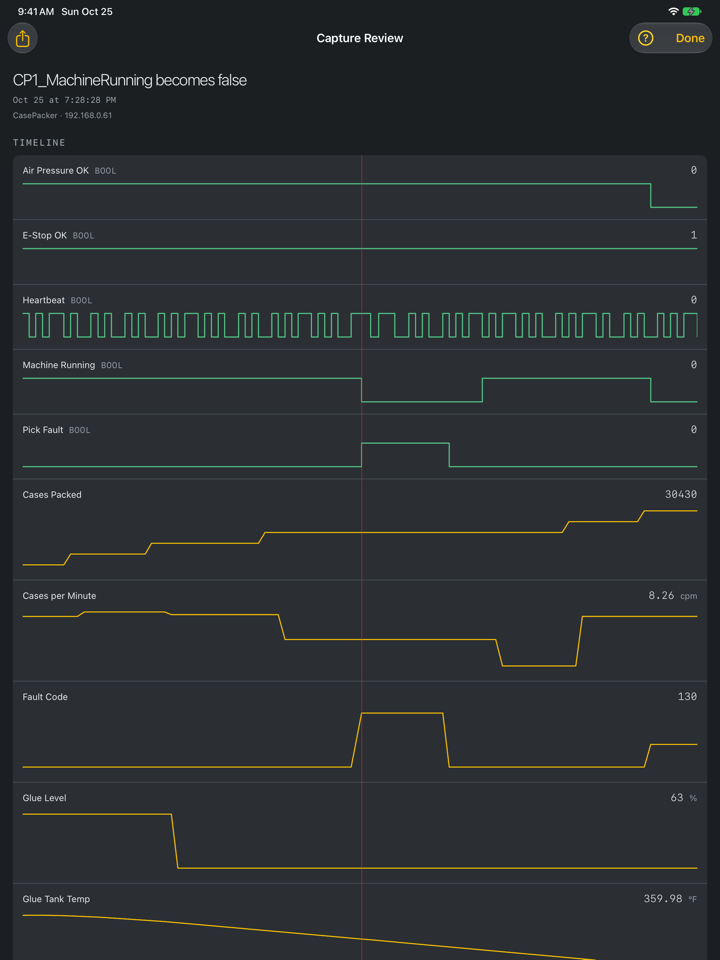
Arm a trigger on a tag condition, such as a bit going false or a value crossing a setpoint, and leave LScope open with the screen awake. When it sees the condition, LScope keeps the sampled values from the thirty seconds before it as well as the thirty after, because the interesting part has usually happened by the time anyone notices. The window is yours to set. LScope reads by polling, so a change shorter than the polling interval can be missed.
See what moved, and in what order
Digital signals draw as a logic-analyser timeline: square steps, never smoothed, because a bit does not ramp between states. Analog values sit underneath on the same axis with the trigger marked, so the sequence of events reads off the screen instead of being reconstructed from memory.
Find the step that runs long
Point LScope at the machine's step register and it times observed step changes and records selected companion tags at each observed boundary. It shows you where the cycle time actually goes: one step, called out, rather than a log to read through. Exports as a spreadsheet.
Watch the tags that matter
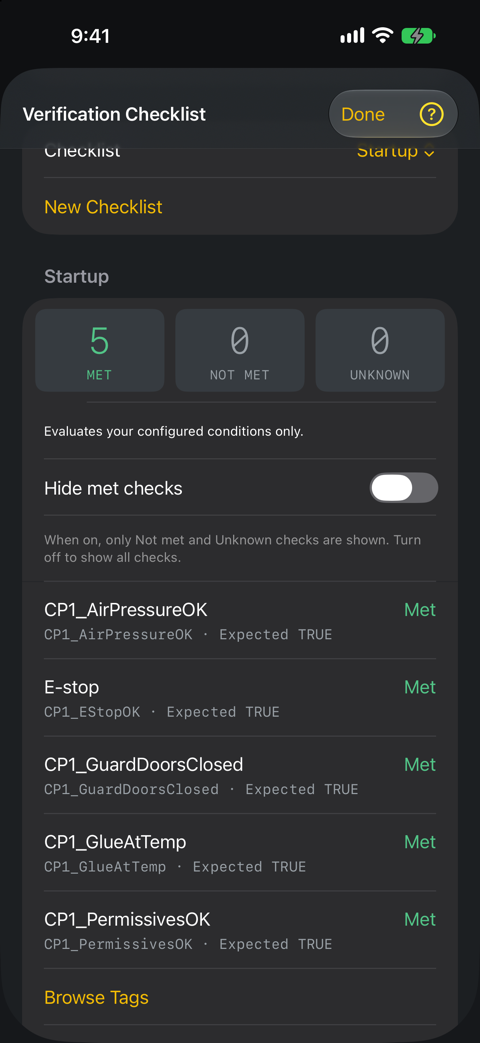
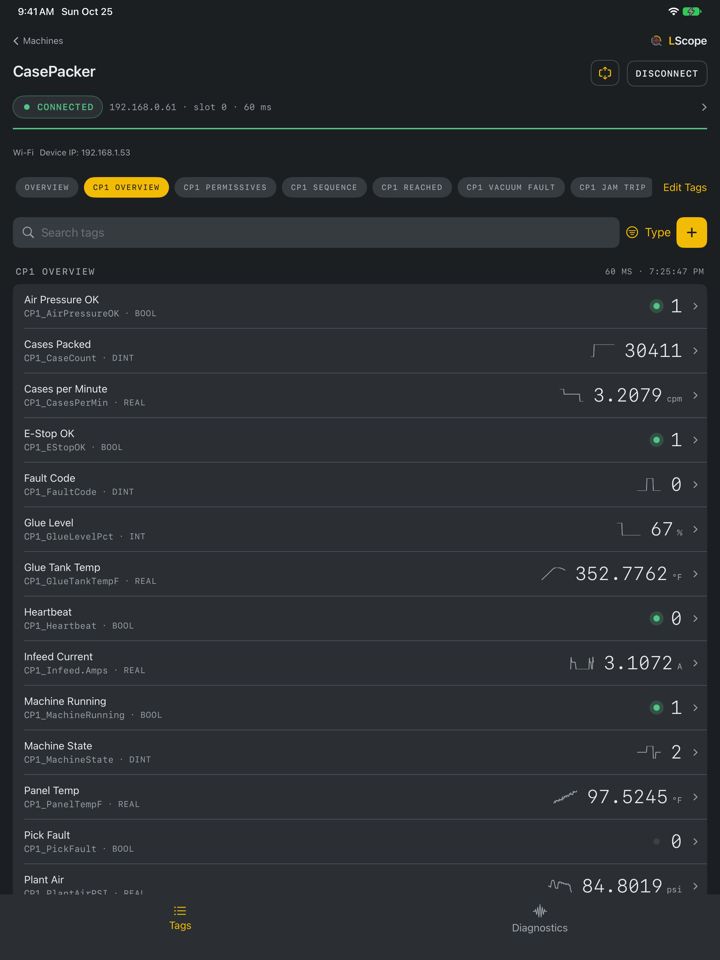
Browse the controller's tags, group them by subsystem, and label them the way you talk about them: "Fill Weight, g" rather than Fill_Weight. The controller's own name stays underneath for when you open the program. Latching alarms on watched tags, audible until acknowledged while LScope is open, so a condition LScope saw trip is still on record after it clears.
Leave with proof, not a memory
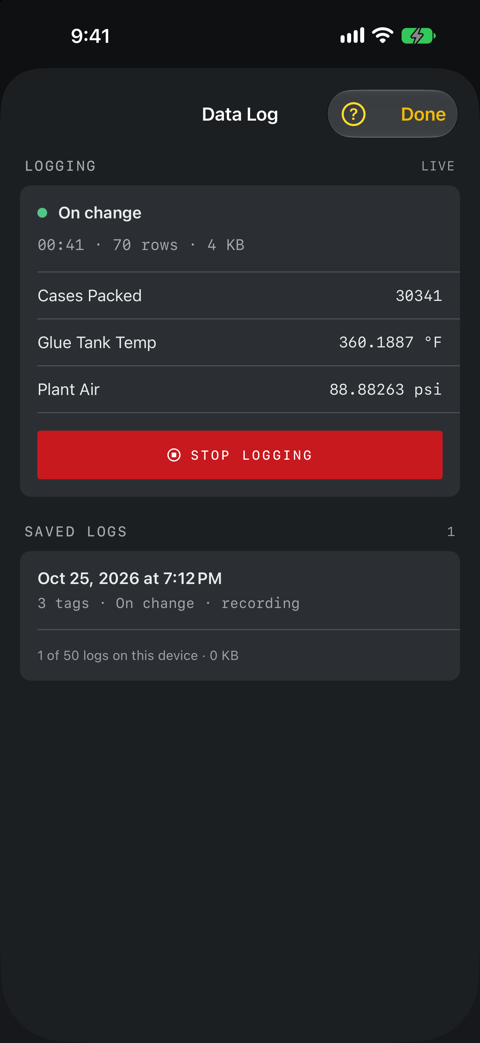
Share captures, trends and snapshots as reports or CSV files, and sequence runs and data logs as CSV for a spreadsheet. A data log records chosen tags at a fixed interval or on change while LScope is open. Gaps stay blank rather than carrying the last value forward. A record has to be able to say it does not know.
Shows what it could not read
Readings that fail or stop arriving are marked missing or stale instead of sitting there looking live, and exported files leave those cells blank. Connection health is reported in plain language. If a capture was armed too late to hold a full window, it says so rather than letting you believe you are looking at thirty seconds. Alarms run while the app is open, because iOS does not permit a background connection. LScope holds the screen awake for you by default. LScope cannot detect a reading that is wrong at the source, such as a value from the wrong controller, so check the controller identity it shows.
At the machine
Compare up to eight watched signals. Trigger windows are configurable. Timing comes from app observations, so changes between polls can be missed. Explore the feature guides.
Compatibility
- Device
- iPhone or iPadiOS or iPadOS 17.6 or later.
- Controllers
- Allen-Bradley® Logix over EtherNet/IP™CompactLogix® and ControlLogix® processors, addressed by IP and backplane slot or a configured route.
- Equipment coverage
- Tested on CompactLogix 1769-L24ER (firmware 34) and 1769-L23E (firmware 20) controllers and a ControlLogix 1756-L73Other controller models and firmware revisions have not been tested by us. Controller model, firmware, supported types and network route affect compatibility, so run the connection test and confirm reads on your equipment before relying on them.
- Network
- A route to the controller on TCP port 44818You enter the controller's address; LScope does not scan the network for controllers. Connections that require CIP Security™ are not supported.
- Data types
- BOOL, signed and unsigned integers, REAL, LREAL and STRINGPlus bit access within a word. STRING tags and user-defined string types are read as text. Browse structures and arrays to read supported members, elements and bits. Whole structures are not decoded as single values; open one to read its members.
- Tag scope
- Controller-scoped and program-scoped tags
- Sequence timing
- Needs a step registerAny tag whose value changes as the machine advances: a step number, a state word. LScope times the gaps between changes.
- Running in background
- Not permitted by iOSiOS does not let an app like this hold a controller connection in the background, so capture and alarms run with the app open. That is why LScope keeps the screen awake for you. It is built in and on by default.
Getting on the network
Connect through an Ethernet adapter, plant Wi-Fi or an authorized VPN. Your phone and network must have a route to the controller.
Ethernet adapter
The most reliable route, and the one to reach for when Wi-Fi at the machine is marginal. Plug an adapter into the phone and land directly on the machine subnet.
Wi-Fi
Join the plant or machine wireless network. Convenient, and only as good as the coverage where the machine actually is, often the worst spot in the building.
VPN
If your controls network is reachable over a VPN, connect it and LScope reaches the controller through it like any other route, useful for a machine you are not standing next to.
Tested adapters
The two adapters actually used to read a controller from an iPhone. Links to them are Amazon affiliate links. A cheap adapter that enumerates as the wrong device class is a bad thing to discover at a stopped machine.
Anker PowerExpand USB-C to Gigabit Ethernet
iPhone 15 and later
Lightning to Ethernet adapter, with charging port
iPhone 14 and earlier · 100 Mbps, passes power through
As an Amazon Associate I earn from qualifying purchases.
What else you need
- The controller's IP address.
- Its backplane slot. A CompactLogix with a built-in Ethernet port is slot 0; a ControlLogix chassis routes through the Ethernet module to whatever slot the processor sits in. Getting this wrong is the most common reason a connection registers but every tag read fails.
- Permission to be on that network. Many plants treat the control network as restricted, and connecting a personal device can be a disciplinary matter even when using read-only diagnostic tools.
Price
Free demo. LScope Pro for your own controllers.
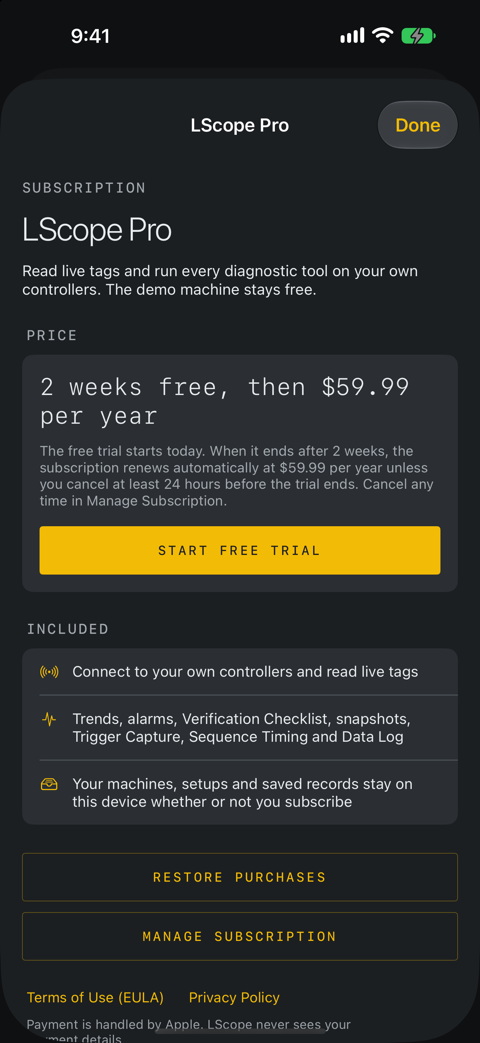
LScope is free to download, and the built-in demo machine runs every tool on simulated data with no purchase. Connecting to your own controllers needs LScope Pro: US $59.99 per year, with a 2-week free trial for new subscribers.
- Price
- US $59.99 per yearThe App Store shows the price in your own currency, plus any applicable tax. Payment is through your Apple Account.
- Free trial
- 2 weeks, for new subscribersUnless you cancel at least 24 hours before the trial ends, your Apple Account is charged US $59.99 when it ends. If you cancel during the trial you are not charged, and LScope Pro can stop straight away.
- Renewal
- Automatic, every yearThe subscription renews at the current price unless you cancel at least 24 hours before the end of the year. If you cancel after paying, LScope Pro stays active until the end of the year you paid for.
- Cancel or manage
- In Settings, under your name, then SubscriptionsOr choose Manage Subscription on LScope's subscription screen. Deleting the app does not cancel the subscription. Refunds are handled by Apple.
- Without a subscription
- The demo machine stays freeYour machines, setups and saved records stay on the device whether or not you subscribe.
Read-only
LScope sends only read and connection requests. It has no function to write tags, change controller mode, download programs or make online edits.
Like any device on the network, it adds communication traffic, and you still need permission to connect. Read-only access does not replace your plant's network, cybersecurity and machine-safety approvals.
Safety
LScope is a diagnostic instrument, not a safety device, and not part of any machine's safety system. Never use it to decide a machine is safe to approach. Follow your lockout/tagout procedure. A reading can be stale, wrong, or from the wrong controller, and the app cannot always tell.
Questions
What is LScope?
LScope is a read-only diagnostic app for iPhone and iPad that reads live tag values from Allen-Bradley Logix controllers over EtherNet/IP. It is made by LeRoy Industrial LLC for controls engineers and maintenance technicians troubleshooting a stopped or intermittent machine.
Which PLCs does LScope work with?
Allen-Bradley Logix controllers, including CompactLogix and ControlLogix, addressed by IP address and backplane slot or a configured route. It has been tested on CompactLogix 1769-L24ER and 1769-L23E controllers and a ControlLogix 1756-L73. Other models and firmware revisions have not been tested by us, so run the connection test on your equipment first.
Can LScope change anything in the PLC?
No. LScope sends only read and connection requests. It has no function to write tags, change controller mode, download programs or make online edits. You still need permission to connect to the control network.
Do I need a laptop or Studio 5000® to use it?
No. LScope connects from the iPhone or iPad straight to the controller's IP address and browses its tags. If you already have a Studio 5000® tag export, you can import it to bring in tag descriptions, but it is optional.
How does the iPhone or iPad reach the controller?
Through an Ethernet adapter, plant Wi-Fi or a VPN, as long as the device has a route to the controller on TCP port 44818. You enter the controller's address; LScope does not scan the network. Connections that require CIP Security are not supported.
How much does LScope cost?
LScope is free to download, and the built-in demo machine runs every tool on simulated data with no purchase. Connecting to your own controllers needs LScope Pro: US $59.99 per year, with a 2-week free trial for new subscribers. It renews automatically unless you cancel at least 24 hours before the trial or the year ends; cancel in Settings, under your name, then Subscriptions.
Can LScope catch an intermittent fault?
Trigger Capture keeps the sampled values from before and after a tag condition you choose, such as a bit going false, while LScope is open. LScope reads by polling, so a change shorter than the polling interval can be missed.
Does LScope keep running in the background?
No. iOS does not allow an app like this to hold a controller connection in the background, so capture, logging and alarms run while LScope is open. LScope keeps the screen awake for you.
Is LScope available for Android or Windows?
No. LScope runs on iPhone and iPad with iOS or iPadOS 17.6 or later.
Does LScope collect my data?
No. There is no account, no sign-in, no analytics and no servers of ours. Machines, tag names and records stay on your device unless you export them. Purchases are handled by Apple.
Support
Stuck at the machine?
The help center has a guide for every tool, with setup steps, how to read the results and what to check when a connection or read fails.