Feature guide
Import and export machine setup
Transfer supported saved configuration using a .lscope file and review changes before importing.
Find it: Diagnostics > Export Setup; Machines > Import Machine Setup
What a setup includes
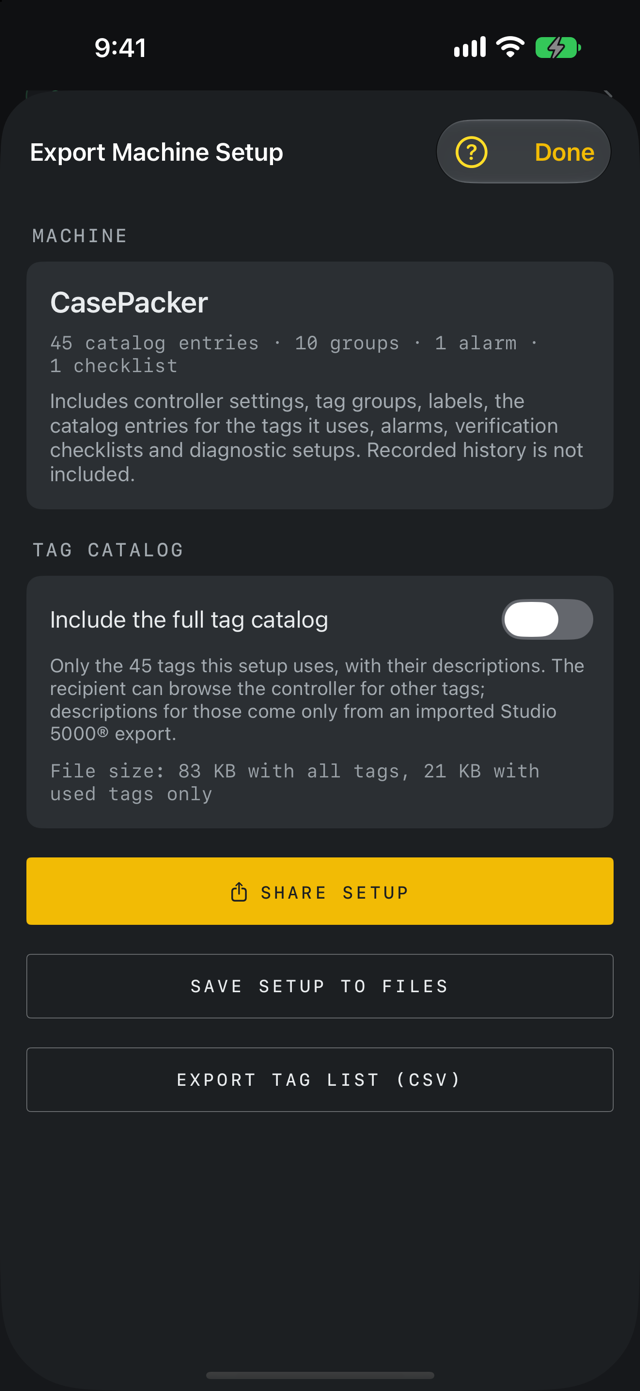
The .lscope format includes controller settings, tag groups, display labels, the saved tag catalog, alarms, verification checklists, data log setup and diagnostic setup. It preserves trigger rules and timing, sequence tags, trend windows, comparison selections and window, trend/capture export formats, checklist selection and filter, alarm-history filter, and the active tag group used by snapshots and captures. Recorded history, report notes, chart cursors and running states are separate. Import never connects, arms or records automatically.
Save a setup
Open Export Setup. Share Setup sends the .lscope file straight to Messages, Mail, AirDrop or another app; Save Setup to Files saves it to a location you choose. On a device with LScope, a received .lscope file can be opened in LScope, which shows the import review first; it can also be saved to Files. A setup sends only the tags it uses, with their descriptions; the recipient can browse the controller for other tags. When the machine has a saved tag catalog, turn on Include the full tag catalog to send every catalog tag as well, so the recipient can see every imported description and search without connecting. The screen shows the file size both ways.
Review an import
Choose a .lscope file from Import Machine Setup. Inspect the machine name, target, group counts and checklists. Choose Create new machine for a separate copy, or explicitly choose the machine to replace. Confirm the displayed operation before importing.
Understand replacement
Replacing a machine setup overwrites its configuration, including groups, alarms and checklists. Historical records are retained. Creating a separate copy gives the configuration a fresh identity. Importing does not automatically connect to the controller or start recording.
If a file is rejected
Use a supported LScope setup file, not a renamed CSV. Unsupported versions, excessive size and invalid definitions are rejected. Keep the original file and review the error. If sharing between devices, compare the imported definitions before using them.
Routes and exact alarm thresholds
Setup files keep optional controller routes and exact integer alarm thresholds. Older versions of LScope may not read those fields, so review the imported controller target and alarm definitions before connecting. Recorded history stays separate from the setup.